Sex Toy MCP Server for Claude and ChatGPT
The free sex toy and funscript MCP server. Claude, ChatGPT or any MCP app plays motion on The Handy, Autoblow, VacuGlide, Kiiroo KEON, OSSM and Lovense toys, and makes the script in your editor. No account.
On this page
https://mcp.scriptcompiler.com/mcp Free, with no ScriptCompiler account. See the setup steps.
Play a 20 second slow build up that ends fast on my Handy. My key is Xy7rT2k.
play_motion  ScriptCompiler
Playing on Handy
0:20
ScriptCompiler
Playing on Handy
0:20 - Length
- 0:20
- Strokes
- 25
- Average tempo
- 74 a minute
- Range
- 0 to 100
Playing on your Handy now. It starts slow and short, builds for 16 seconds and ends on full, fast strokes. Say stop at any time.
How it Works
ScriptCompiler runs a free MCP server for sex toys and funscripts. MCP is a standard way for AI apps to use outside tools. Add the ScriptCompiler MCP server to your AI app once. Then describe a motion in plain words. The AI app turns your words into parts, like 20 seconds of slow strokes, and sends them to the server. The server makes the funscript and either plays it on your device or writes it into the script open in your editor.
The device tools are below. The editor tools are under Edit the Script in Your Editor.
| Tool | What it does | Needs your key |
|---|---|---|
create_motion | Shows the motion as a timeline card. Plays nothing. | No |
play_motion | Plays the motion on your device. A new motion replaces the one playing. | Yes |
stop_motion | Stops your device. | Yes |
Devices You Can Control
One MCP server works for strokers, masturbators, vibrators and sex machines. Tell your AI which device you have and give it the key.
| Device | Type | Connects over | Your AI needs |
|---|---|---|---|
| The Handy, Handy 2 and Handy 2 Pro | Automatic stroker | Wi-Fi | Connection key |
| Autoblow AI Ultra | Automatic stroker | Wi-Fi | Device token |
| VacuGlide 2 | Suction stroker | Wi-Fi | Device token |
| Kiiroo KEON | Automatic stroker | Bluetooth | Device ID |
| Kiiroo ProWand | Wand vibrator | Bluetooth | Device ID |
| OSSM | Sex machine | Bluetooth | Device ID |
| Every Lovense toy | Vibrators, masturbators and sex machines | Bluetooth | Device ID |
Bluetooth toys play through the ToyController phone screen. See Bluetooth Toys.
Lovense toys
Every Lovense toy plays: Lovense Ambi, Lovense Calor, Lovense Diamo, Lovense Dolce, Lovense Domi, Lovense Edge, Lovense Exomoon, Lovense Ferri, Lovense Flexer, Lovense Gemini, Lovense Gravity, Lovense Gush, Lovense Gush 2, Lovense Hush, Lovense Hyphy, Lovense Lapis, Lovense Lush, Lovense Max, Lovense Mini Sex Machine, Lovense Mission, Lovense Mission 2, Lovense Nora, Lovense Osci, Lovense Osci 3, Lovense Ridge, Lovense Sex Machine, Lovense Solace, Lovense Solace Pro, Lovense Spinel, Lovense Synth, Lovense Tenera, Lovense Velvo, Lovense Vulse. Lovense toys turn the motion into vibration. A higher position means a stronger vibration.
Other funscript devices
Ask your AI for the motion and press Download on the
motion card. The .funscript file plays on any device that
plays funscripts, like the OSR2 and SR6. For multi-axis devices,
link your editor and your AI writes every axis.
What You Need
- An AI app that can add MCP servers, such as Claude, ChatGPT or Claude Code
- To edit a script: ScriptCompiler open in a browser tab
- To play on a device: The Handy, Autoblow or VacuGlide, switched on and online over Wi-Fi, and its connection key (The Handy) or device token (Autoblow, VacuGlide) from the device maker's app
- For a Bluetooth toy: the toy paired on the ToyController phone screen, and the Device ID that screen shows. See Bluetooth Toys.
You do not need a ScriptCompiler account. The MCP server is free. With an account you can skip the editor code.
Add it to Your AI App
Add ScriptCompiler to Claude
- Open claude.ai or Claude Desktop. Go to Customize, then Connectors.
- Click Add, then Add custom connector.

- Name it ScriptCompiler. Paste the address below and click Continue. There is no sign in.
https://mcp.scriptcompiler.com/mcp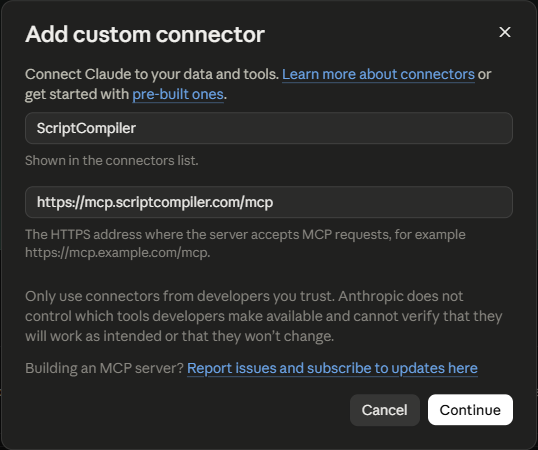
- In a chat, click +, then Connectors, and turn on ScriptCompiler.
The Claude Free plan allows one custom connector. On Claude Team and Enterprise, an owner adds the connector first.
Add ScriptCompiler to ChatGPT
- Open ChatGPT on the web. The free plan works. Click Plugins in the left sidebar.
- Click Add at the top right, then Add custom MCP server.
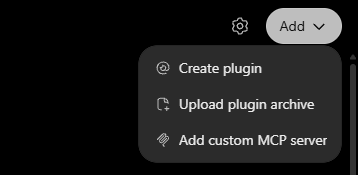
- Name it ScriptCompiler. Keep Server URL and paste the address below. Set Authentication to No authentication. Tick I understand and want to continue and click Create as a plugin.
https://mcp.scriptcompiler.com/mcp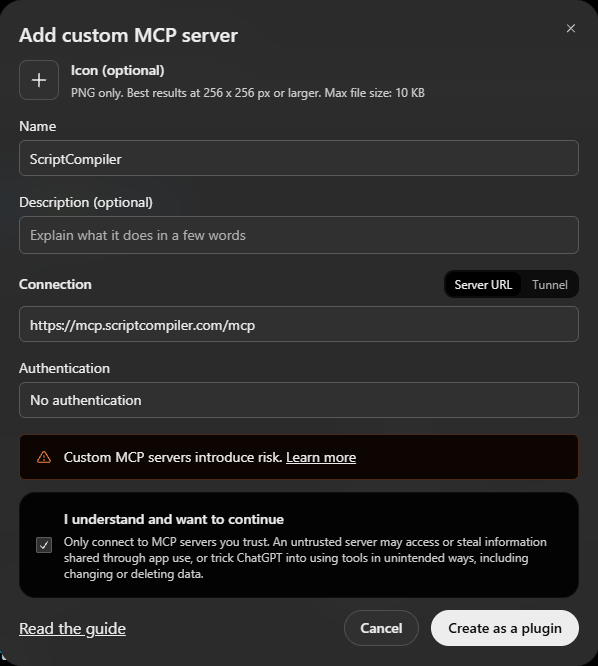
- In a new chat, type @ and pick ScriptCompiler.

ChatGPT menu names change often. Playing a motion is a write action, and some ChatGPT plans limit write actions.
Add ScriptCompiler to Claude Code
- Run this command in your terminal.
- Start Claude Code and ask for a motion.
claude mcp add --transport http scriptcompiler https://mcp.scriptcompiler.com/mcpClaude Code follows the same Anthropic rules as Claude.
Add ScriptCompiler to any MCP app
- Add a remote MCP server with the ScriptCompiler URL. Apps that read an
mcp.jsonfile take this entry. - Start a chat and ask for a motion. There is no sign in.
{
  "mcpServers": {
    "scriptcompiler": { "url": "https://mcp.scriptcompiler.com/mcp" }
  }
}
The app needs Streamable HTTP. In an app that lets you pick the model, any model that can call tools works.
Play Your First Motion
- Start a new chat and check that ScriptCompiler is turned on
- Describe a motion, for example Make a one minute slow build up. The AI app shows it as a timeline card.
- Say Play it on my Handy and give your connection key
- Say Stop at any time. The device stops right away.
Ask for changes in plain words, like a bit faster or longer at the top. Each new motion replaces the one that is playing.
Bluetooth Toys
The Kiiroo KEON, Kiiroo ProWand, OSSM and every Lovense toy work too. They play through the ToyController phone screen, which keeps the Bluetooth link to your toy. Your AI reaches it with the Device ID the screen shows.
- Turn the toy on and close the maker's app. A toy talks to one app at a time.
- On the phone or computer next to the toy, open toycontroller.com/controller in Chrome or Edge. On iPhone and iPad, use Bluefy.
- Pair the toy on that page. It shows a Device ID, like h3x9kq.
- Give your AI the Device ID with your request, for example Play a slow build up on my Bluetooth toy. My Device ID is h3x9kq.
- Keep the page open and the screen on while it plays. Say Stop at any time.
- Lovense toys vibrate. A higher position means a stronger vibration.
- OSSM: turn the speed knob to zero before you play, then turn it up. The knob sets the top speed.
- Anyone with the Device ID can move your toy while the page is open. Close the page to end it.
The motion card
In Claude and other apps that support MCP Apps, the motion shows as a ScriptCompiler card: the speed strip from the Script Overview, the motion on a timeline with a cursor that follows playback, the length, strokes, tempo and range, and a Stop button. Other apps answer in text.
Download saves the motion as a .funscript
file named after the motion's title. It holds the same points the device
plays, and it opens in the
ScriptCompiler editor
and in any funscript player.
Edit the Script in Your Editor
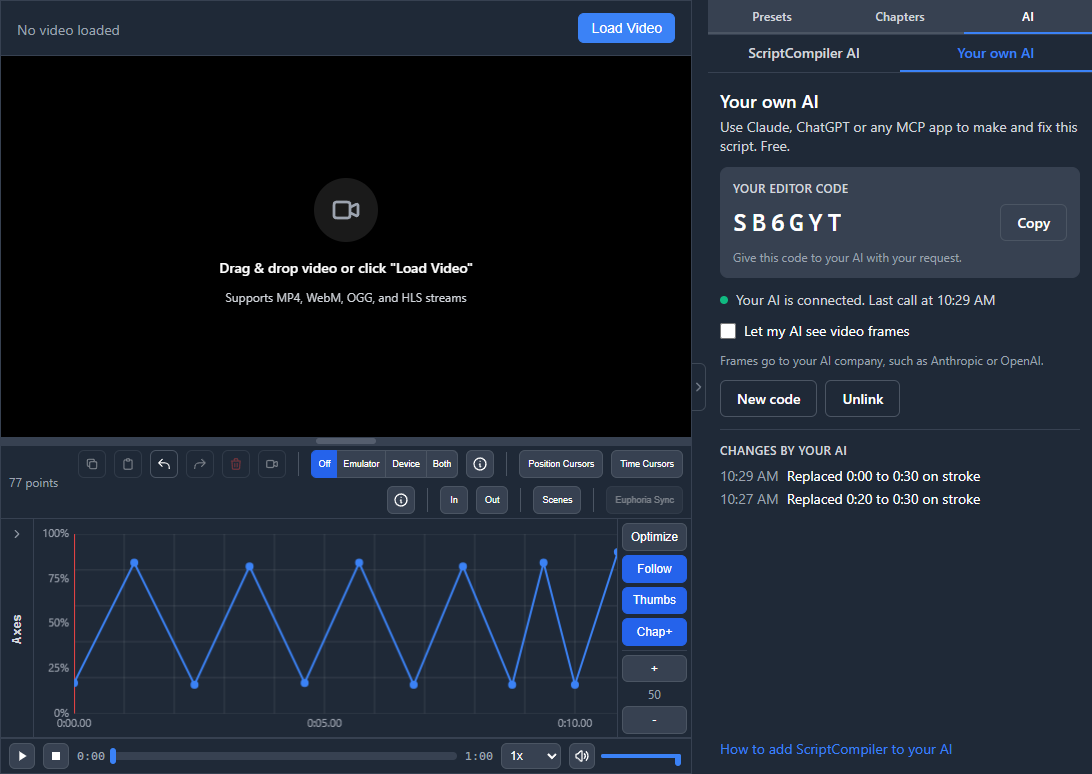
Your AI can also make and fix the script open in the ScriptCompiler editor. Each change shows on the timeline right away. Look at it, ask for the next change, and keep going.
- Add ScriptCompiler to your AI app first. See Add it to Your AI App. You do this once.
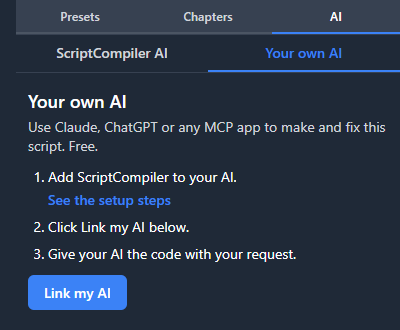
- Open ScriptCompiler and click Your own AI in the left tool bar. On a phone, it is in the menu.
- Click Link my AI. The editor shows a code, like K7P4QX.
- Give your AI the code with your request, for example My editor code is K7P4QX. Read my script and tell me what to improve.
- Each change lands on the timeline and in the change list under the code. Ctrl+Z undoes it on the axis you are on, or ask your AI to undo its last change.
| Tool | What it does |
|---|---|
read_script | Reads the whole script: each axis, parts too fast for devices, chapters, the video length and your selection |
read_points | Reads the points in one part of an axis |
write_points | Writes a described motion or exact points into a part of one axis |
edit_points | Adds, moves or deletes single points at exact times and keeps the rest |
write_coordinated_axes | Writes several axes at once that move to the same beat |
derive_axis | Builds an axis from another, for example a twist that follows the stroke |
run_editor_tool | Runs a Tools panel tool, such as Speed Limiter. Pro tools need Pro. |
clear_points | Deletes points, only when you ask for it |
edit_chapters | Adds, renames, moves or removes chapters |
undo_last_change | Undoes your AI's last change, unless you edited that part since |
control_playback | Plays, pauses or jumps to a time, so you can watch and feel a part |
look_at_video | Looks at still frames of your video, only when you allow it |
Ask it what to improve
- Read my script and tell me what to improve.
- Fix the parts that are too fast for my Handy.
- Make 1:00 to 1:30 build up slowly, then go fast until the end of the chapter.
- Add twist and roll that follow the stroke.
- Jump to 2:10 and play. I will tell you how it feels.
Let your AI see the video
Turn on Let my AI see video frames under the code. Then your AI can look at up to 6 still frames at a time to see what happens in a part. It stays off until you turn it on. The frames go to the company behind your AI app, such as Anthropic or OpenAI, and their rules decide what it will look at. Video files from your computer work. Some videos opened from links do not allow it.
A few still frames cannot time each stroke. To follow the motion in the video, run Script Sniper, then ask your AI to clean up the result.
Your editor code
- The code works while the editor tab is open and linked. After a reload it links again with the same code.
- Anyone with the code can change your script, so only give it to your AI. New code makes the old one stop working at once. Unlink turns the link off.
- One tab at a time. If the same code is linked in a second tab, the newest tab takes over.
- The editor link is free and works without a ScriptCompiler account. Pro tools stay locked on the Free plan.
Sign in and skip the code
Signed in to ScriptCompiler? Add this address to your AI app instead.
https://mcp.scriptcompiler.com/account/mcp The app asks you to sign in with your ScriptCompiler account once. Then click Link my AI in the editor and just ask. Your AI finds your editor by your account, so you never give it a code.
- When you are signed in, Your own AI shows this address with a Copy button.
- The editor tab still has to be open with Link my AI on. If more than one tab is linked, your AI uses the one you linked last.
- Playing on a device works the same on both addresses.
What to Ask For
-
Slow, deep strokes for two minutes.
-
Build up from slow to fast over a minute, then hold at the top for ten seconds.
-
Quick short strokes at the top, then long slow ones. Repeat it three times.
-
Medium speed with a natural feel for five minutes.
Talk about speed, depth, length and how they change. The AI app knows these words:
| Ask for | What it means |
|---|---|
| Speed | Slow is 20 to 40 strokes a minute, medium 50 to 90, fast 100 to 160 and very fast 170 and up. One stroke is one full down and up. |
| Depth | Positions run from 0 at the bottom to 100 at the top. Short strokes at the top means a range like 70 to 100. |
| Build up or slow down | Speed and depth change bit by bit across a part |
| Stroke shape | Crisp, smooth, staying low longer, a short pause at the top, or a slow rise with a quick drop |
| Pauses | Stay still at one spot for a while |
| A natural feel | A little randomness in speed and depth, so it feels less like a machine |
| Repeat | Plays the whole motion again, up to 100 times in a row |
| Exact points | Paste a funscript and it plays those points as they are |
At high speed the device has less time for each stroke, so strokes get shorter. That is normal.
Section fields
Your AI sends a motion as sections. Each section is one stretch of motion:
| Field | Values |
|---|---|
duration_seconds | Length of the section |
kind | strokes or hold |
strokes_per_minute, strokes_per_minute_end | 1 to 300. The end value changes the tempo bit by bit. |
bottom, top, bottom_end, top_end | Stroke depth, 0 (bottom) to 100 (top). The end values change the depth bit by bit. |
curve | snap, ease, settle, hold-peak, rise |
variation | 0 to 1. 0.2 to 0.4 feels natural. |
position | Hold sections only: the position to hold |
actions takes exact funscript points as
{ "at": milliseconds, "pos": 0 to 100 } instead of sections.
Limits
- Every motion is fitted to 400 units per second, the top speed of these devices, or 350 for Bluetooth toys. Strokes that are too fast get shorter and the timing stays the same, like the Speed Limiter.
- One motion can last up to 1 hour, repeats included, and hold up to 10,000 points
- Up to 30 plays a minute per device. Stop always works.
- Playing on a device uses one axis. In the editor your AI can write every axis.
- Up to 60 editor requests a minute per editor code
Your Connection Key
The key is the only thing the server needs. It goes through your AI app, so the company behind the app can see it in your chat. Our server sends it to the device service and never writes it to a log.
Claude and ChatGPT Rules
Anthropic and OpenAI decide what Claude and ChatGPT will do, not ScriptCompiler. They may refuse some requests. Describe the motion itself: speed, depth, length and shape. That gives the clearest result. In an app that lets you pick the model, you can pick another model.
Troubleshooting
No ScriptCompiler editor is linked with that code
- Check the code under Your own AI in the editor. Upper or lower case both work.
- If the panel says Linked in another tab, click Link here
No ScriptCompiler editor is linked to this account
- Open ScriptCompiler and sign in with the same account you used in your AI app
- Open Your own AI and click Link my AI
The editor did not answer
- Keep the ScriptCompiler tab open. It can stay in the background.
The user changed the script while you were working
- You edited the same part while your AI worked. Your AI reads the script again and redoes the change. Nothing is lost.
This video does not allow frame grabs
- Load the video from a file on your computer
Couldn't reach the Handy with that connection key
- Check that the device is switched on and online over Wi-Fi
- Check that the key matches the one in the device maker's app
No open ToyController phone screen has that Device ID
- Open toycontroller.com/controller on the phone or computer next to the toy and pair the toy
- Give your AI the Device ID shown on that page
The phone screen with the Bluetooth toy is closed or offline
- Open the phone screen again and keep it open with the screen on, then ask again
- To stop the toy right away, press Stop on the phone screen or turn the toy off
The Handy didn't respond
- The device went offline. Check that it is switched on and online, then ask again.
Too many plays on this device in the last minute
- Wait a moment, or ask for all your changes as one longer motion
The device service is busy
- Wait a minute and try again
The AI app does not use ScriptCompiler
- Turn the connector on for this chat. In Claude, click +, then Connectors. In ChatGPT, type @ and pick ScriptCompiler.
- Name it in your message, for example Use ScriptCompiler to play a slow motion
Frequently Asked Questions
What is the ScriptCompiler MCP server?
It connects AI apps like Claude and ChatGPT to ScriptCompiler. Your AI can make and fix the script open in your editor, and play a motion you describe on your toy.
Is there an MCP server for sex toys?
Yes. The ScriptCompiler MCP server is a free sex toy MCP for Claude, ChatGPT and any MCP app. Add https://mcp.scriptcompiler.com/mcp once, then ask for a motion in plain words. It plays on strokers, masturbators, vibrators and sex machines.
Is there a funscript MCP server?
Yes. Your AI makes funscripts through the ScriptCompiler MCP server. It writes points into the script open in your editor, or makes a motion you download as a .funscript file.
Can AI control my stroker or masturbator?
Yes. The Handy, Handy 2, Autoblow AI Ultra, VacuGlide 2, Kiiroo KEON, OSSM and the Lovense Max, Solace and Calor all play motion from Claude, ChatGPT or any MCP app. Describe the speed, depth and length, and your AI turns it into strokes.
Can Claude control The Handy?
Yes. Add the ScriptCompiler MCP server, ask Claude for a motion and give it your Handy connection key. ChatGPT and other MCP apps work the same way.
Can ChatGPT control my sex toy?
Yes. Add https://mcp.scriptcompiler.com/mcp as a custom MCP server in ChatGPT, the free plan works. Then type @, pick ScriptCompiler and ask for a motion.
Is there an MCP server for The Handy?
Yes. The ScriptCompiler MCP server plays on every Handy model, including the Handy 2 and Handy 2 Pro. Give your AI the connection key from the Handy app.
Is the Handy 2 controllable via MCP?
Yes. The Handy 2 and Handy 2 Pro connect the same way as The Handy: give your AI the connection key from the Handy app.
Is the Kiiroo KEON controllable via MCP?
Yes. Pair the KEON on toycontroller.com/controller and give your AI the Device ID that page shows. Every motion is fitted to 350 units a second, so the KEON can follow it.
Is the Kiiroo ProWand controllable via MCP?
Yes. Pair the ProWand on toycontroller.com/controller and give your AI the Device ID that page shows.
Is the Autoblow AI Ultra controllable via MCP?
Yes, over Wi-Fi. Give your AI the device token from the Autoblow app.
Is the VacuGlide 2 controllable via MCP?
Yes, over Wi-Fi. Give your AI the device token from the VacuGlide app.
Is the OSSM controllable via MCP?
Yes. Pair the OSSM on toycontroller.com/controller and give your AI the Device ID. Turn the speed knob to zero before you play, then turn it up.
Is there a Lovense MCP server?
Yes. Every Lovense toy plays through the ScriptCompiler MCP server: Ambi, Calor, Diamo, Dolce, Domi, Edge, Exomoon, Ferri, Flexer, Gemini, Gravity, Gush, Gush 2, Hush, Hyphy, Lapis, Lush, Max, Mini Sex Machine, Mission, Mission 2, Nora, Osci, Osci 3, Ridge, Sex Machine, Solace, Solace Pro, Spinel, Synth, Tenera, Velvo, Vulse. Pair it on toycontroller.com/controller and give your AI the Device ID.
Is the Lovense Lush, Hush, Max or Nora controllable via MCP?
Yes, like every other Lovense toy. A higher position in the motion means a stronger vibration.
My toy is not on the list. Can I still use it?
Ask your AI for the motion and press Download on the motion card. The .funscript file plays on any device that plays funscripts, like the OSR2 and SR6. Link your editor and your AI writes every axis of a multi-axis script.
Which AI apps work?
Claude, ChatGPT, Claude Code and any app that can add a remote MCP server over Streamable HTTP. In an app that lets you pick the model, any model that can call tools works.
Is it an NSFW or adult MCP server?
Yes. It is made for adult toys and funscripts. Claude and ChatGPT still follow their own rules, so describe the motion itself: speed, depth and length.
Can my AI script a porn video?
Yes, in the editor. Load the video, link your AI and it writes funscript points on the video timeline. With Let my AI see video frames on, it can look at still frames, but Claude and ChatGPT decide what they will look at. To follow the motion in a video, run Script Sniper first.
Can my AI edit the script in the ScriptCompiler editor?
Yes. Open Your own AI in the editor, click Link my AI and give your AI the code. It can read the script, write points on any axis, run editor tools, change chapters and undo its last change. Each change shows on the timeline at once.
Can my AI see my video?
Only when you turn on Let my AI see video frames under Your own AI. Then it can look at up to 6 still frames at a time. The frames go to the company behind your AI app.
What is the ScriptCompiler MCP server URL?
https://mcp.scriptcompiler.com/mcp. It uses Streamable HTTP and needs no sign in.
Does it cost anything?
No. The MCP server is free and needs no ScriptCompiler account or plan. With an account you can use the account address and skip the editor code. Your AI app uses its own plan for the chat.
Which sex toys work with the MCP server?
Every Handy model, the Autoblow AI Ultra and the VacuGlide 2 over Wi-Fi. The Kiiroo KEON, Kiiroo ProWand, OSSM and every Lovense toy over Bluetooth, through the ToyController phone screen.
Where do I find my connection key?
For The Handy, Autoblow and VacuGlide, in the device maker's app. The Handy calls it the connection key. Autoblow and VacuGlide call it the device token. For a Bluetooth toy, it is the Device ID on the ToyController phone screen.
Can Claude or ChatGPT control my Lovense toy?
Yes. Every Lovense toy works. Pair it on toycontroller.com/controller and give your AI the Device ID that page shows. Lovense toys vibrate, so a higher position means a stronger vibration.
Can I try it without a device?
Yes. Ask for a motion without giving a key. The AI app shows it as a timeline card and plays nothing. Ask it to play the motion later and give your key.
Will Claude or ChatGPT control my toy without the connector?
No. Claude and ChatGPT only use connectors you added. Add https://mcp.scriptcompiler.com/mcp as a custom connector once, then ask for a motion in any chat.
How do I stop the motion?
Say stop in the chat, or press Stop on the motion card. The device stops right away.
Can I download the funscript Claude creates?
Yes. Press Download on the motion card. The .funscript file holds the same points the device plays and opens in the ScriptCompiler editor and any funscript player.
Can I play a funscript I already have?
Yes. Paste the funscript into the chat and ask the AI app to play it. It plays your exact points, up to 10,000 of them.
Can it sync a motion to a video or to music?
In the editor, yes: your AI writes points at times on the video timeline. A motion played straight on a device plays on its own. For a script that follows the beat of a song, use the Music Scripter.